Parking Escape.
Small cars. Big escape. Find the right order and get every car out.
50 levels · Tap to escape · Progress saved on your device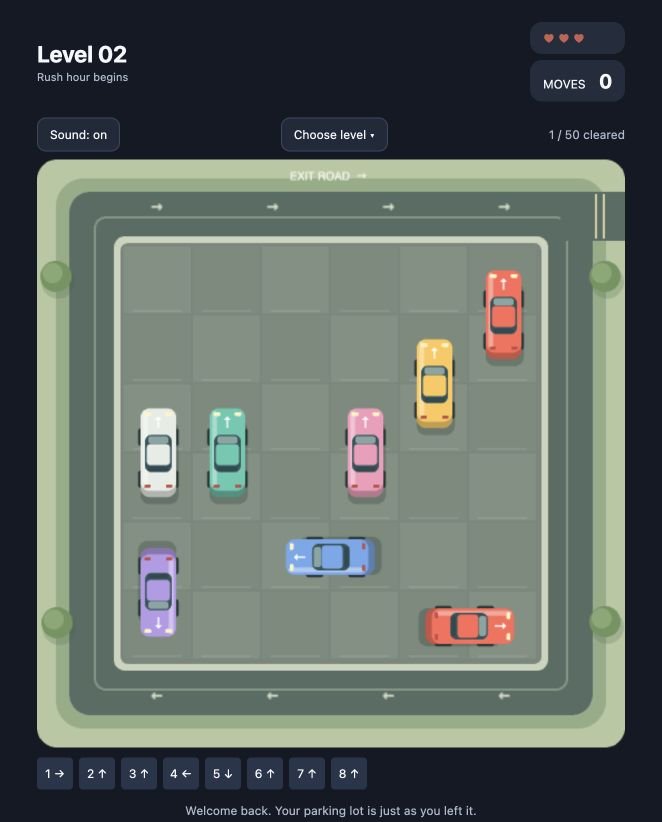
Ready for a little escape?
50 parking puzzles. Three hearts. One clear path.
Play Parking Escape ↗Play opens the game in a new tab with a loading screen. Your saved progress stays on this device.
One parking lot. Fifty little challenges.
Parking Escape is a tap-to-clear puzzle with a six-by-six parking area, colorful cars and a looping exit road. Every vehicle follows its arrow. Read the lot, clear the blockers, and enjoy a little victory when the final car leaves.
Pick up where you left off.
Your current lot, cleared levels and sound preference are saved in this browser’s local storage when available. Refreshing can resume your game; clearing browser site data removes the save. Progress does not transfer between devices, browsers or separate preview addresses.
Take your time.
There is no countdown. Try the first lot to learn the controls, then unlock harder arrangements. Wait for moving cars to finish before restarting or undoing. You can tap additional cars while earlier cars drive away.
Parking Escape: frequently asked questions
How do I play Parking Escape Puzzle?
Press Play to load the game. Tap a car to send it in the direction of its arrow. A car can leave only when its path is clear. Empty the whole parking lot to complete the level. For keyboard play, Tab to a numbered car button below the board and press Enter or Space.
Is Parking Escape free to play?
Yes. All 50 levels in this release are free to play in your browser. No account, download or purchase is required. Complete a level to unlock the next one.
What happens when I lose all three lives?
Each level starts with three hearts. Tapping a blocked car costs one heart. When all three are gone, press Restart to try the current level again with three hearts. Previously cleared levels stay unlocked.
How do Hint and Undo work?
Hint highlights a car whose path is clear without spending a heart. Undo restores the last successful car escape when available; it does not refund hearts lost from blocked taps. These controls may be unavailable while cars are moving, and they are disabled when no lives remain.
Will my progress be saved?
When browser storage is available, the game saves your current lot, cleared levels and sound preference on this device. Return to CodeDock.in in the same browser to continue. Clearing site data can remove your save. Private browsing may not retain it, and progress does not sync between devices or browsers.
Can I play on an iPhone or Android phone?
The game has touch controls and a responsive layout for mobile browsers, as well as mouse and keyboard controls on desktop. Turn sound on or off inside the game. If loading fails, use Retry on the loading screen or refresh the game tab.
Why does the game load after I press Play?
The page shows a preview first so you can read the instructions without starting the game engine. Press Play to open the game in a new tab. A loading screen stays visible until the game is ready. Loading time depends on your device and connection.
A calmer way to clear a busy lot
Before tapping, follow a car’s arrow to the edge of the parking area. If another car occupies that route, leave it for later. Start with a vehicle on a clear route, then check which path its departure opens up. Watch the direction of each arrow: cars do not turn inside the lot.
Use Hint when several routes look blocked. Undo can restore a successful escape so you can try a different order, but it does not return hearts lost on a blocked tap. If you run out of hearts, restart the current lot; already cleared levels stay unlocked.
If the game will not start
Play opens a separate game tab and shows a loading screen. If your browser blocks the tab, use the direct game link below the preview. If loading takes too long, press Retry. Check that JavaScript is enabled. Clearing site data can remove your progress, so try reloading before clearing storage.